How to 9x your Outbound Conversion Rate with Email Click Tracking


Every email click reveals something about where your prospects are at in the buyer's journey.
And your chances of breaking into it.
Did a snippet of copy peak your prospect's interest? Did an image or link grab their attention? Or did your email speak to a hyper-relevant problem they are actively looking to invest in—right now?
Davit, CEO at LeadRebel, and his team now know. For B2B sales teams drowning in manual follow-ups and generic outreach, click tracking transforms guesswork into precision. It's the difference between hoping someone's interested and knowing exactly what caught their eye — and when to strike while the iron's hot.
In this guide, we'll break down how email click tracking works, why it's a game-changer for conversion rates, and how Davit Svanidze, CEO at LeadRebel, used it to increase their email conversion rate by 9x. Plus, you'll get practical steps to implement click tracking in your own outbound strategy.
People’s attention and patience for sales emails are razor thin at best. The average worker receives over 120 emails in their inbox every single day.
It’s a big reason why Davit, whose software helps users identify website visitors and generate leads, rejects the idea of mass emailing thousands of random contacts and instead keeping your prospect list narrow and specific.
Doing so results in fewer bounced emails and unsubscribes, which goes a long way toward preventing your domain from being penalized for spamming.
“Those deliverability issues are what really hang people up from the start,” Davit says.
When it comes time for follow-up emails, Davit advises judiciousness: Limit how many you send out, and make sure there’s ample time between them.
Above all, he warns, “never, never, ever” email from your main domain. Always use a secondary domain — and have additional domains on standby in case that one is banned.
Before you jump start any email campaign, you need to make sending provisions that set you up for success.
What is email click tracking?
Email click tracking is a method used to monitor and record when a recipient clicks on a link within an email you've sent. It's not just about knowing if someone opened your email; it's about understanding what specific content, call-to-action, or offer was compelling enough to earn a click. This data gives you a direct signal of a prospect's interest and engagement level, turning a simple email into a powerful source of sales intelligence.
How email click tracking works
So, how does the magic happen? When you enable click tracking, your email platform automatically replaces any link in your email with a unique tracking URL. This new link first directs the recipient to a tracking server for a split second to record the click, and then instantly redirects them to the original destination URL. The prospect’s experience is seamless—they won’t even notice the detour. But on your end, that momentary stop logs valuable data, telling you who clicked, which link they clicked, and when.
Benefits of email click tracking for sales teams
Why bother tracking clicks? Because it's one of the clearest indicators of buying intent. A click shows that a prospect has moved beyond passive interest and is actively seeking more information. For sales teams, this means you can:
- Prioritize hot leads: Focus your energy on prospects who are actively engaging with your content.
- Personalize follow-ups: Tailor your next conversation around the specific content they clicked on, making your outreach far more relevant.
- Optimize your messaging: See which links and CTAs get the most action, helping you refine your email copy for better results over time.
How to set up email click tracking
Getting started with click tracking in Apollo is straightforward. You can enable it for your entire team or for individual sequences. Simply navigate to your settings, find the email tracking options, and toggle 'Click Tracking' on. Once enabled, Apollo will handle the rest, automatically converting your links and feeding the click data directly into your contact and account records. There's no complex setup—just a simple switch that unlocks a new layer of sales insights.
All clicks aren't created equal
With a refined lead list and data they trust, Davit and the LeadRebel team used Apollo Sequences to build customizable outreach campaigns with sequential, automatic email touchpoints.
“We sent these campaigns to our broad audience but conversation rates were sitting at about 0.5%,” says Davit.
Which, if you know anything about the competitiveness of B2B sales, isn't that bad. But they knew they could do better by honing in on their timing and targeting.
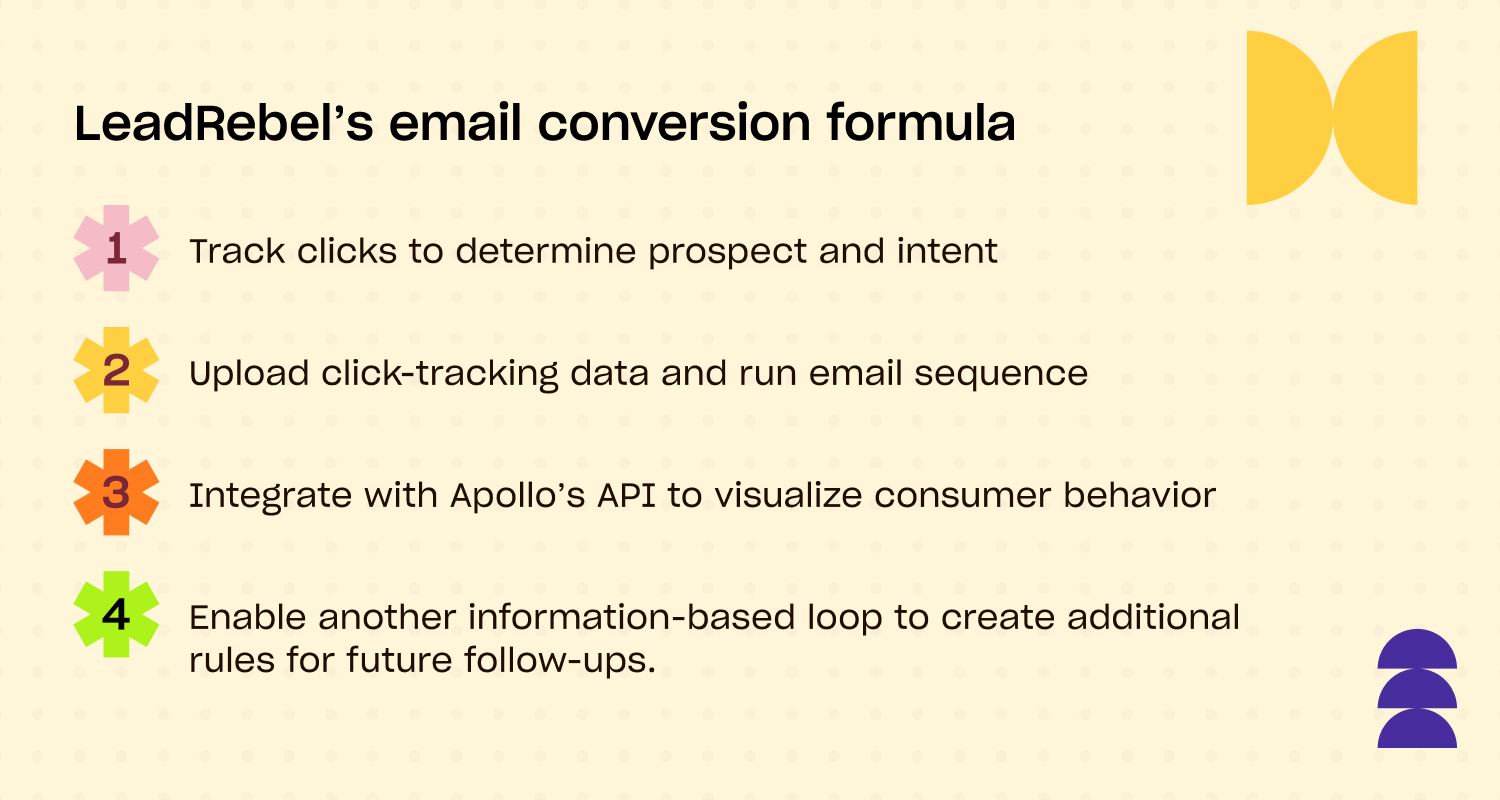
To better suss out and nail down prospect behavior, Davit and his team decided to build an integration with Apollo's Open API to unlock the data they needed to run stronger campaigns.
First, with triggered emails.
Using Apollo Buying Intent, job change alerts, and custom prospecting Signals, LeadRebel narrowed down their target lists. This allowed them to send targeted emails to company who either:
- Directly expressed interest in their offerings
- Or has qualities that make them an ideal user of their product
“It’s important to have some trigger,” Davit says, “A signal that shows you that a company is in your market right now.”
It's important to have some trigger...a signal that shows you that a company is in your market right now.
- Davit Svanidze, CEO at LeadRebel
After a more targeted and precise email send, it was time for the next layer of data.
Click-tracking—one of the most important data signals you can receive from any email campaign. How many emails were opened? What did they click on? Where did they go? How many prompted people to unsubscribe or grouse about spam?
Answers to these questions can lead a company directly to more ROI. The Apollo x LeadRebel integration started by adding UTM parameters to email links.
“When someone clicks on our link, we are able to find out exactly which company it was,” he explains. “Normally we work on the company rather than on a personal level, so 100 percent of the clicks are anonymized.”
Besides knowing the clicker's company, Davit can see the entire history of that person's site activity, including which pages they visited and the duration of those visits.
But email clicks can be very different.
For example, I might click on a link in some email, come to your website, check it out for a couple of seconds and leave. That's a sign that I'm not interested in your website offerings," says Davit.
“But if I go to your website, check your product pages and prices, it's a sign that there's serious interest there.”
Note: Many "clicks" are made by bots and wrongly signal a buying intent or interest. The LeadRebel software can help sellers filter away bot-related clicks and leave only relevant ones!
Based on this information, if the click is determined to be "low-intent" and likely won't pan out, they stop there; no need to waste more time. If it's "high-intent", LeadRebel Marketing sends the lead to Sales because, odds are, it's a purchase-ready lead.
From there, they're able to act accordingly, adding additional steps to sequences and following up with leads based on exactly what the behavior data says.
Determining intent and converting prospects
How does LeadRebel determine the nature of a prospect's intent? It's a process.
After learning which company clicked on their site, where, and for how long, Davit filters that data by page. If someone clicked the signup page or checked out pricing, it's a good bet they're high-intent. If they merely scrolled through legal verbiage and scrammed, they're almost certainly low-intent.
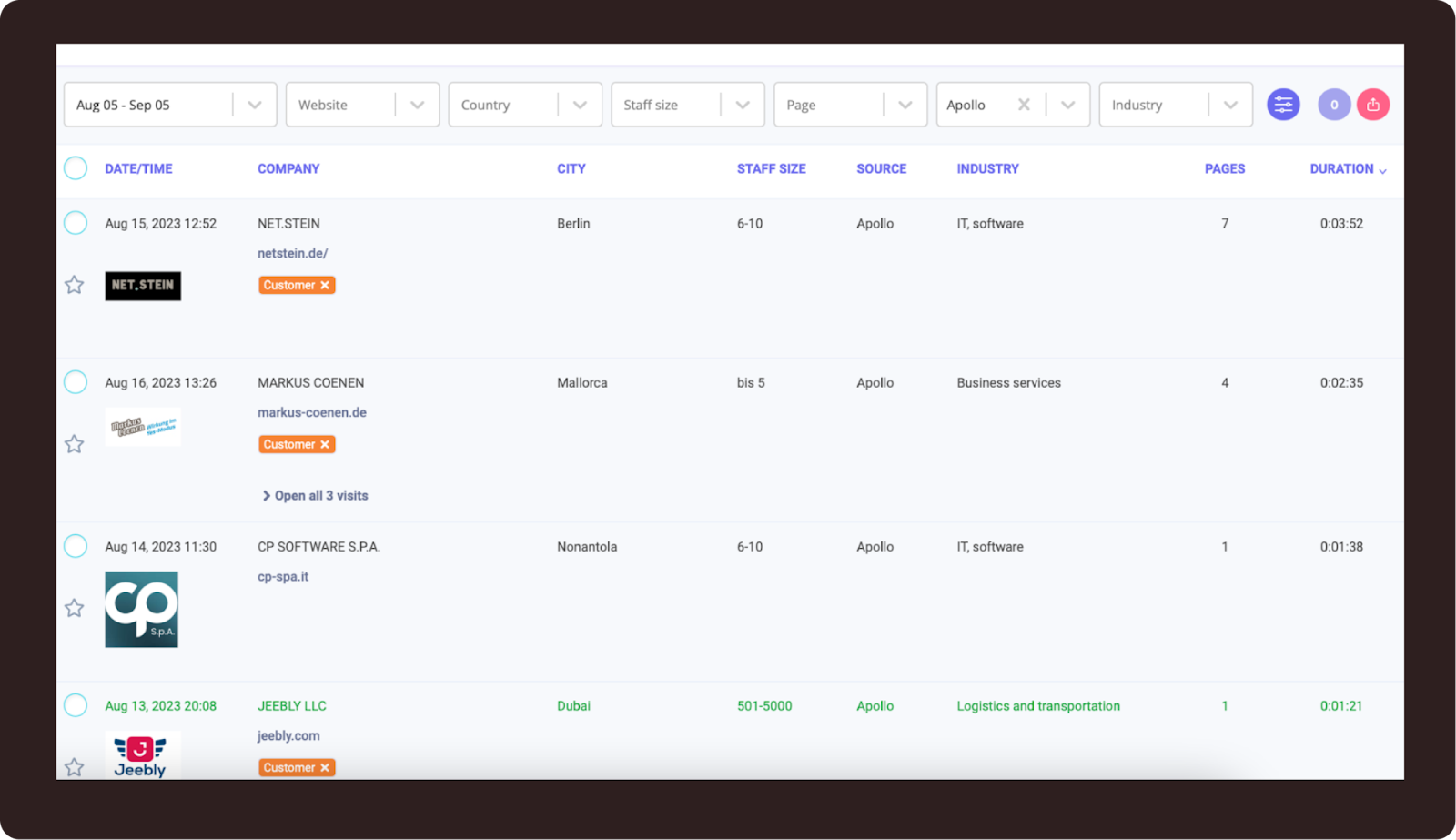
He also uses session recording software to capture video of site activity so he and his team can, in effect, study the tape.
The result of all this parsing and sorting is much higher conversion rates. In the year since they integrated with Apollo's API and began data-driven campaigns, LeadRebel's email conversion rate went from .5% to 4.5% — a 9-fold increase.
Its German campaign alone is pushing 5%.
“The most important thing is to just get started,” Davit says. “Maybe people don’t know what the possibilities are because there’s lots of white noise — so many tools offering different things or the same things and different pricing. For someone who’s not in the software industry, it can be difficult to decide which tool or mix of tools is best.
“But it’s better to just start somewhere. At some point you’ll find the right combination.”
Adding the human touch
There's more to data-driven click-tracking than uncovering buying intent.
It's also about the timing of the follow-up.
“The optimal time between the action of a potential customer and a follow-up is one hour,” Svanidze says. “More time than that lowers the probability of a good conversion.”
That follow-up to the intent trigger doesn't need to be an email either. Davit and his team utilize LinkedIn touchpoints as well as phone calls.
He refers to this outreach as “the human touch,” and it's an essential element of trust-building that no amount of technological wizardry can emulate.
Without it, he says, conversions would be much lower.
“People may have doubts: What kind of tool is this? Why should I use it? It’s always helpful to talk with people about those things and get questions answered right away. Afterwards, lots of people are converted to customers.”
Start tracking clicks to accelerate your sales results
Stop guessing what your prospects want and start knowing. Email click tracking transforms your outreach from a shot in the dark to a data-driven strategy. By understanding exactly what resonates with your audience, you can prioritize the right leads, personalize your follow-ups, and ultimately, close more deals. The data is waiting for you. It's time to put it to work. Get Started with Apollo and see what your clicks can tell you.
Frequently asked questions about email click tracking
What's the difference between click tracking and open tracking?
Open tracking tells you if and when an email was opened, using a tiny, invisible pixel. Click tracking goes a step further, telling you if a recipient engaged with your content by clicking a specific link. While opens signal initial interest, clicks signal active engagement and higher intent.
Is email click tracking legal for B2B sales?
Yes, in most jurisdictions, email click tracking is legal for B2B sales, especially when you're contacting prospects based on legitimate interest. However, it's crucial to be transparent in your privacy policy and comply with regulations like GDPR and CAN-SPAM, which govern commercial emails.
How accurate is email click tracking data?
Click tracking is highly accurate because it requires a direct action from the user. However, be aware that some security software or email clients may 'click' links to scan for malware, which can sometimes result in false positives. Advanced platforms like Apollo often have measures to help filter out this bot activity, giving you a cleaner view of genuine engagement.
Can click tracking hurt my email deliverability?
When done correctly, no. Modern tracking URLs used by reputable platforms like Apollo are designed to be deliverability-friendly. However, using suspicious-looking links from less-reputable services or overusing link shorteners can sometimes trigger spam filters. Sticking with a trusted, integrated platform is the safest bet.
Share this post
Start using Apollo today
Start your free trial with Apollo today—then use these resources to guide you through every step of the process.
Start using Apollo today
Start your free trial with Apollo today—then use these resources to guide you through every step of the process.
or
By signing up, I agree to Apollo's Terms of Service and Privacy Policy.
Continue Learning
Explore these handpicked resources to deepen your understanding of AI-powered GTM
The Complete Go-To-Market Strategy Guide
Whether you're a one-person start up or growth-focused sales orgs, revisiting your go-to-market strategy is essential in this market. Learn how to build one, analyze your competitors, and bring your product to market in this guide.
Inbound or Outbound? How to Incorporate Both Into Your B2B Lead Generation Strategy
If your pipeline feels stalled, the problem might be imbalance—not effort. This guide breaks down how to prioritize and execute inbound and outbound B2B lead generation, with expert-backed tactics and proven programs that drive pipeline. Learn what works, when to use it, and how to scale it.
The B2B Digital Marketing Playbook for Growth on Autopilot
Growth doesn't happen on accident. Here's expert-advice on how to build a B2B digital marketing strategy that helps you understand your buyers better than they expect you to — and show up with the right message before they even ask.
How to Define Your Unique Selling Proposition
Every one of your potential buyer wants to know: what makes you stand apart? Learn how to define your unique selling proposition and communicate your distinct value in this blog.