API Mastery Made Simple: Explore Apollo's Developer Hub
APIs are a double-edged sword.
On one hand, they are incredibly powerful, enabling you to connect a software's functionality to your other tools and processes in ways that are meaningful and wholly integrated.
On the other hand? They can be incredibly difficult to understand.
Success is determined by the quality of documentation.
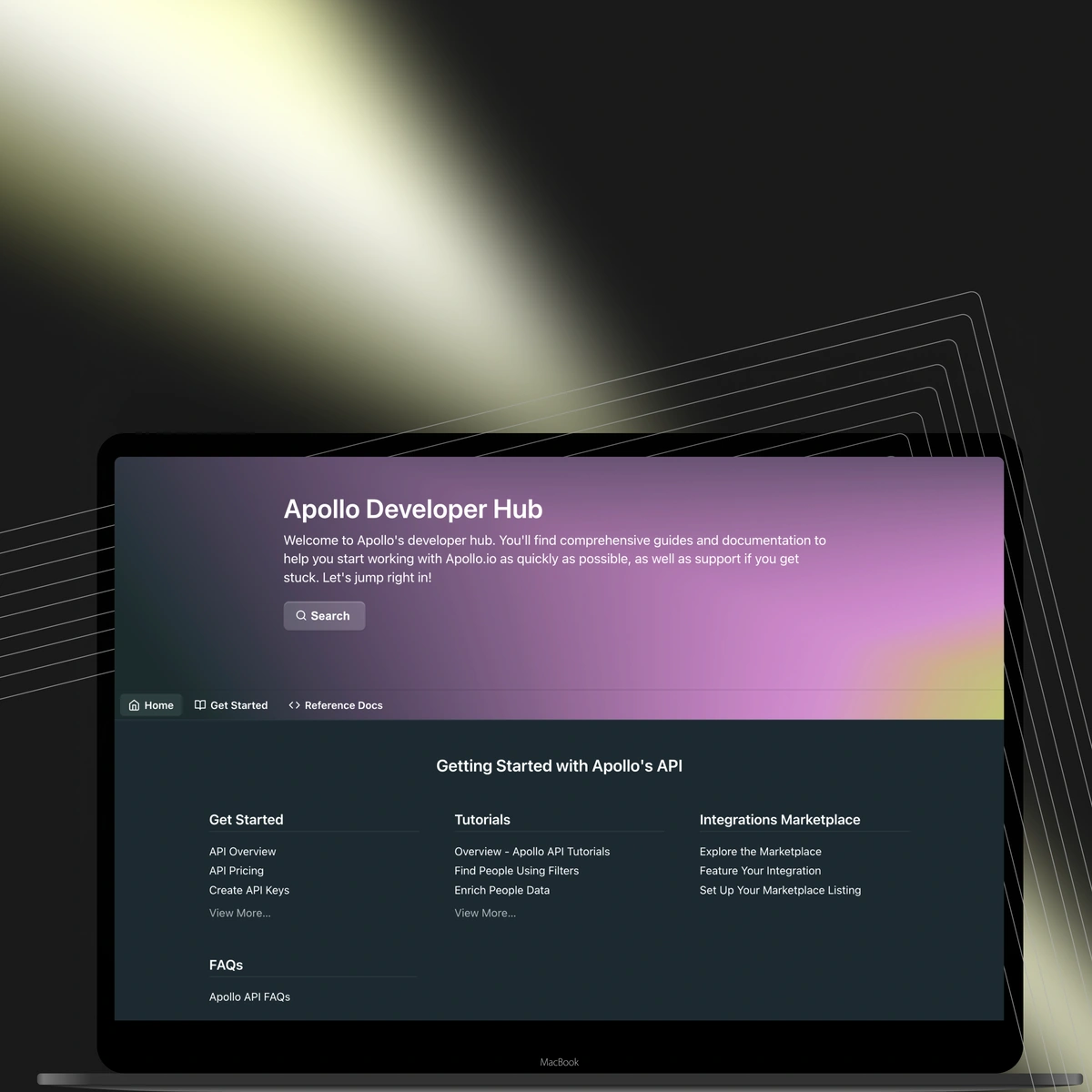
This is why Apollo has launched a new and improved API Developer Hub — to better support the partners and customers that are building unique business solutions with Apollo's powerful APIs.

The Developer Hub features:
- Endpoint testing directly in the docs (API keys required)
- Clear, accurate language to describe the available parameters and general endpoint functionality
- Tutorials for common Apollo.io API use cases
- OAuth 2.0 implementation guidance for Apollo.io partners
It's chock full of information — with several approachable articles with step-by-step tutorials for implementing your dream integrations and workflows.
Explore Apollo's API Developer Hub for yourself.
Review of the basics: What's an API?
APIs are an integral component of how the internet — and modern business — works.
Take your banking app, for example. What you see on your screen is just the front-end. Your bank doesn't actually store your account balance or recent transactions on your phone. Instead, that information is kept on a server.
To create and display your unique information, the bank generates an API key linked to your account. Every time you log in, this API key is used to securely fetch your information from the bank's servers.
In the same way that a key opens a lock, this API "key" allows you to access and customize a software's powerful features in a way that's unique to you.
And "endpoint URLs" give that action a path. They provide the specific addresses where the API can access data or perform actions. When you use your API key to make a request, it directs the app to the correct endpoint, allowing it to retrieve the information you want it to.
Apollo's Developer Hub makes it easy to create API keys and provides the endpoint URLs — with each one's use case — to build powerful workflows for your go-to-market teams.
Apollo API authentication and access
Getting started with the Apollo API is straightforward. Before you can make your first call, you'll need to generate an API key. This key is your unique identifier that tells our system you have permission to access and request data.
You can find and create your API key by navigating to Settings, then Integrations, and selecting the API option. Once you have your key, you're ready to start exploring what's possible.
Available Apollo API endpoints
Our API gives you access to the core components of the Apollo platform. We've organized our endpoints into logical groups to make them easy to find and use. You can interact with endpoints for Enrichment, Search, Contacts, Accounts, Deals, Sequences, and more.
Each endpoint is designed to perform a specific function, from fetching a list of contacts to adding a prospect to an automated sequence.
What you can do with Apollo's API
So, what does all this mean for you? With Apollo's API, you can build powerful, custom workflows that fit your exact needs. Keep your CRM data fresh and accurate with our Enrichment endpoints. Automate your prospecting by using the Search API to find ideal contacts and accounts.
You can even manage your outreach at scale by programmatically adding contacts to Sequences. The goal is to let you integrate Apollo's data and functionality seamlessly into your existing systems, saving you time and eliminating manual work.
Put Apollo.io's public APIs to the test
To generate an API key and get started with testing, check out the Create API Keys article in the docs.
You can also test the endpoints in the docs by using an API key to authenticate your API requests and entering values for the parameters.
Keep in mind that your access to endpoints is potentially limited by your team's Apollo.io pricing plan and the scopes you apply to your API key.
With an API key in hand, head to the reference docs and start testing endpoints for data enrichment, contact and account creation, sequences, and more.
And if you're not ready to test, no worries – you can review example responses (including schema) for every endpoint without testing.
To test an endpoint, you should:
- Enter your API key in the Authorization Header field.
- Choose one of the available programming languages.
- Enter details in the parameters to generate your API request. At a minimum, address the required parameters. As you add values to the parameters, the API request will update live.
- Click Try It! to send your request.
The response from the API appears directly in the docs.
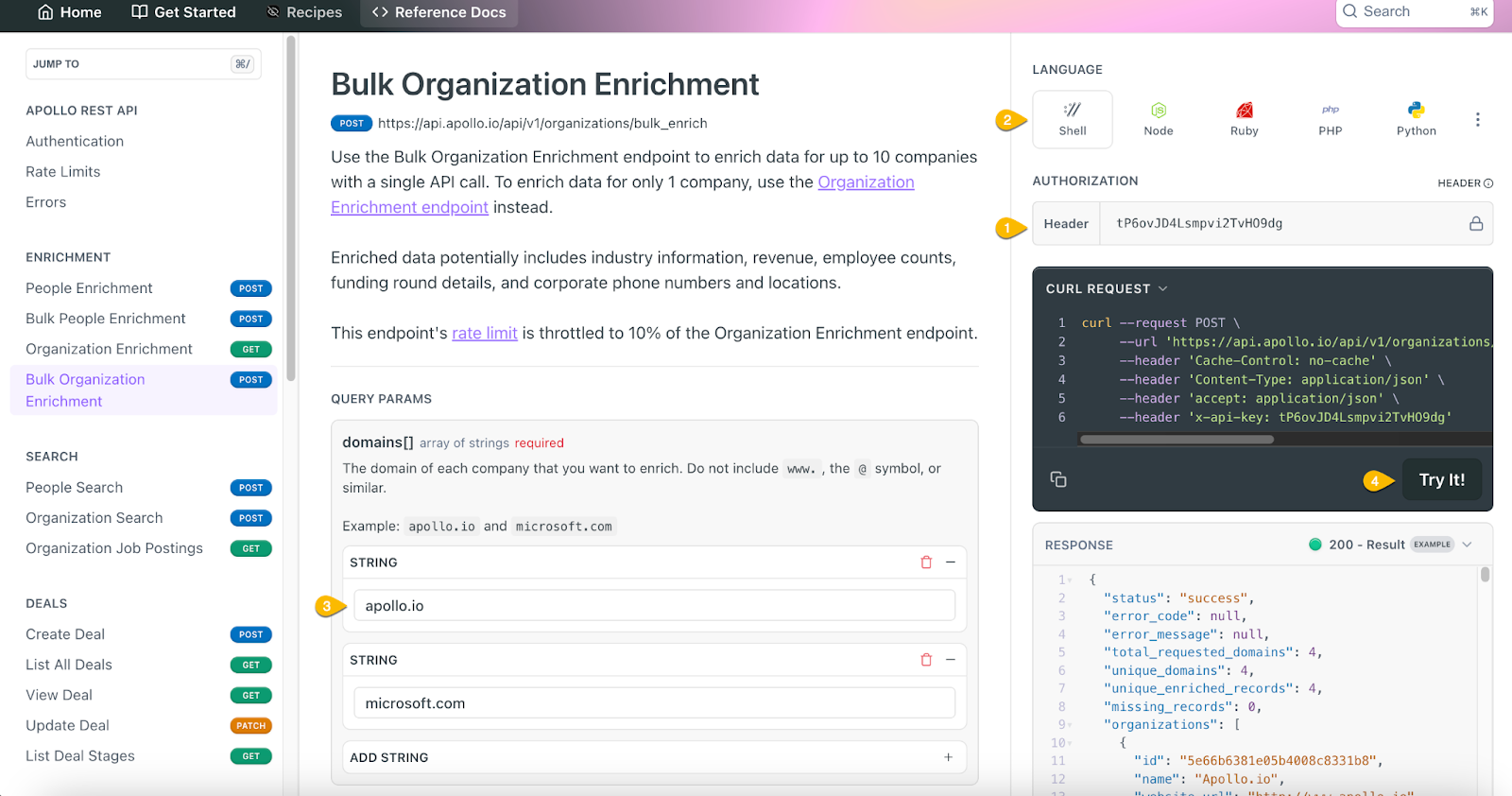
Follow this, step-by-step, in Apollo's API Developer Hub. It's open and ready for you to test, use, and customize today.
Build a better Apollo with us by becoming a partner
Have a great idea for an integration that features Apollo.io functionality?
Build your integration using our APIs and apply to be featured on Apollo.io's Marketplace!
This directory features the best, most powerful, most inventive integrations that our community has to offer. Once yours is approved, your API integration will be available to our user base of over one million Apollo.io customers with your name alongside it.
Learn more about our partnerships programs here.
Start building with Apollo's powerful API
The power of Apollo's API is its flexibility. It's designed to help you connect our best-in-class data and sales tools to the systems you already use every day. Whether you're looking to enrich your database, automate prospecting, or build a custom integration, our Developer Hub has the resources you need to get started.
Stop switching between tabs and start building a more efficient GTM motion. Get Started with Apollo today.
Frequently asked questions about Apollo API
How do I get my Apollo API key?
You can generate your API key directly within the Apollo platform. Navigate to Settings > Integrations, find the API option, and click Connect to create and view your key.
What can I do with Apollo's REST API?
Our REST API allows you to perform most of the actions available in the Apollo UI. This includes searching for contacts and companies, enriching data, managing sequences, creating tasks, and much more. It's designed to help you integrate Apollo's core functionality into your own applications and workflows.
Are there usage limits for Apollo's API?
Yes, access to the API and its usage limits are based on your Apollo pricing plan. Different plans provide different levels of access and credit allowances for API calls. You can find detailed information in our API documentation.
Can I test Apollo's API functionality before implementing?
Absolutely. Our Developer Hub allows you to test endpoints directly in the documentation. You can use your API key to make live requests and see real responses, which helps you understand how everything works before you write a single line of code.
What programming languages work with Apollo's API?
Because our API is a standard REST API that uses JSON, it's language-agnostic. You can interact with it using any modern programming language that can make HTTP requests, such as Python, JavaScript, Ruby, Java, or PHP.
Share this post
Start using Apollo today
Start your free trial with Apollo today—then use these resources to guide you through every step of the process.

Start using Apollo today
Start your free trial with Apollo today—then use these resources to guide you through every step of the process.
or
By signing up, I agree to Apollo's Terms of Service and Privacy Policy.
Continue Learning
Explore these handpicked resources to deepen your understanding of AI-powered GTM
The Future of Go-to-Market
Data vendor, sequencer, enrichment tool, dialer, RevOps stitching it all together. That's how GTM has been built for a decade. Here's why it's time for that to end, and the system replacing it.
Apollo Launches Agents: Find More Buyers, Build Better Sequences, Improve What’s Working, All Without Asking
GTM systems should get smarter over time, learning what works for your business and proactively finding ways to improve. Apollo CPO Mark Sieglock explains how Apollo is building that system, and bringing recommendations directly to you via Slack.
Apollo is now available in ChatGPT
Search prospects, enrich contacts, add to sequences, and analyze performance — without leaving ChatGPT. The full outbound loop, now in one conversation.
Apollo Selected as a Data Provider for HubSpot’s New Breeze Prospecting Agent
Apollo's 230M+ contact database is now embedded in HubSpot's Breeze Prospecting Agent, currently available in public beta with a 28-day free trial.