
What Are CRM Integrations and Why Do They Matter in 2026?
CRM integrations connect your customer relationship management system with other business tools to create a unified data ecosystem. They eliminate manual data entry, reduce errors, and give your team real-time visibility into customer interactions across every touchpoint.
Yet Bain reports that 70% of companies are failing to effectively integrate their sales plays into their revenue technology tools, including CRM, limiting expected growth gains. The integration exists, but the execution doesn't.

Stop Chasing Dead Leads With 96% Accuracy
Tired of spending 4+ hours daily hunting for contact info? Apollo verifies 224M contacts so your team connects with real buyers, not bounced emails. Join 550K+ companies closing more deals.
Start Free with Apollo →Key Takeaways
- CRM integrations eliminate data silos by connecting your CRM with sales engagement, marketing automation, and analytics tools
- Research from New Breed Revenue shows 95% of companies acknowledged operational gaps in their CRM and CMS systems, emphasizing the need for strategic integrations
- Bi-directional sync (writeback) ensures data flows both ways, keeping every system current without manual updates
- The global CRM software market is valued at approximately $101.4 billion in 2024 and is projected to reach $262.74 billion by 2032, according to SLT Creative
- Modern integrations enable AI-driven workflows, real-time personalization, and automated revenue operations
What Are CRM Integrations?
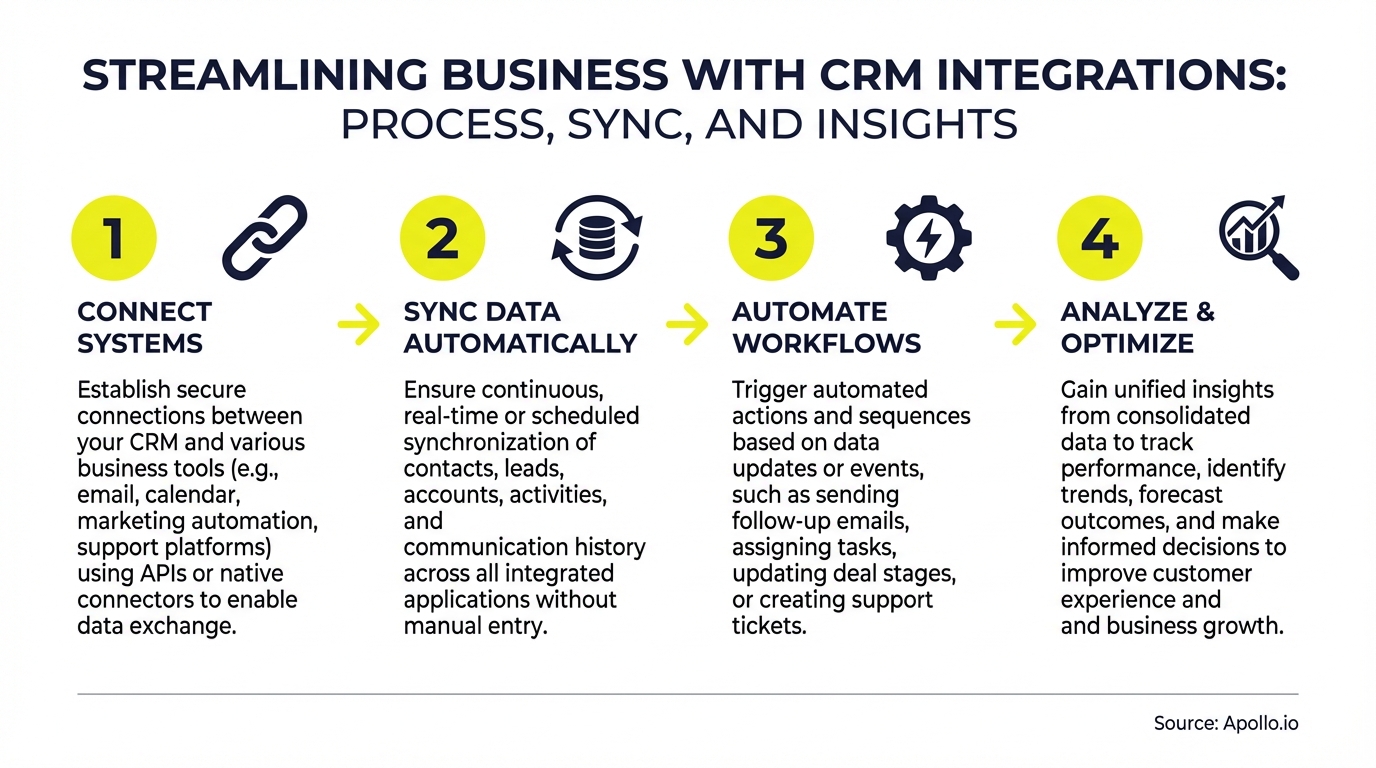
CRM integrations are technical connections that allow your CRM to share data with other business systems. They enable automatic data synchronization between platforms like email tools, calendar apps, marketing automation, sales engagement, analytics, and support systems.
Instead of manually copying contact details from your prospecting tool into Salesforce or HubSpot, integrations handle the transfer instantly. When a prospect responds to an email sequence, the engagement data flows back into your CRM automatically.
"Apollo enriches everything we have: contacts, leads, accounts... And we don't really have to touch it, it just works."
Types of CRM Integrations
| Integration Type | Purpose | Common Examples |
|---|---|---|
| Sales Engagement | Automate outreach, track sequences, log activities | Apollo, Outreach, SalesLoft |
| Marketing Automation | Sync leads, track campaigns, measure attribution | Marketo, Pardot, HubSpot Marketing |
| Data Enrichment | Auto-populate contact/company details | Apollo, ZoomInfo, Clearbit |
| Communication | Log emails, calls, meetings automatically | Gmail, Outlook, Zoom, Gong |
| Analytics & BI | Report on pipeline, revenue, and team performance | Tableau, Looker, Power BI |
Why CRM Integrations Matter for Revenue Teams
Fragmented data costs companies real revenue. When customer information lives in disconnected systems, reps waste time switching between tools, leads fall through cracks, and leadership lacks visibility into what's actually working.

According to SalesHive, businesses using AI within their CRM are 83% more likely to exceed sales goals due to AI's support in lead scoring, predictive analytics, and personalized customer interactions. But AI only works when your data is unified and current.
The Real Cost of Poor Integration
When systems don't talk to each other, teams experience:
- Manual data entry errors: Reps spend hours copying information between tools, introducing mistakes that damage personalization and follow-up
- Incomplete customer records: Critical context lives outside the CRM, forcing reps to dig through emails and Slack threads
- Delayed follow-up: Without real-time alerts, hot leads go cold while reps wait for daily sync cycles
- Inaccurate forecasting: Leadership makes decisions on stale or incomplete pipeline data
Need to eliminate data silos? Apollo's unified platform enriches your CRM automatically with 224M+ verified contacts.
Turn Forecast Guesswork Into Revenue Certainty
Struggling with unreliable pipeline visibility? Apollo delivers real-time deal intelligence and 224M verified contacts so your team forecasts with confidence. Built-In increased win rates 10% using Apollo's scoring.
Start Free with Apollo →How Modern CRM Integrations Actually Work
Most CRM integrations use APIs (application programming interfaces) to exchange data between systems. When a new contact enters your CRM, the integration triggers an API call to pull enrichment data, add them to email sequences, or update your analytics dashboard.
Native vs. Third-Party Integrations
Native integrations are built directly by the software vendor. They're typically more reliable, require less maintenance, and offer deeper functionality because they're designed specifically for that platform combination.
Third-party integrations use middleware platforms like Zapier or iPaaS solutions. They're more flexible for connecting niche tools but may have sync delays or limited field mapping. According to Cazoomi, the global integration/iPaaS market was valued at USD 10.70 billion in 2023 and is projected to grow to USD 12.87 billion by the end of 2024, reaching USD 78.28 billion by 2032.
Learn how to connect Apollo with Salesforce and HubSpot in minutes for bi-directional data sync.
Real-Time Sync vs. Batch Processing
Modern revenue teams need real-time data flow. When a prospect opens your email or visits your pricing page, that signal should trigger immediate action (automated follow-up, Slack alert, task creation).
Batch processing (syncing data every few hours or overnight) creates gaps where opportunities slip through. Real-time integrations enable the "agentic workflows" that are becoming standard in 2026, where systems autonomously take action based on customer behavior.
Essential CRM Integrations Every Revenue Team Needs
The right integration stack depends on your go-to-market motion, but most high-performing teams integrate these categories:
1. Sales Engagement and Prospecting
Connect your CRM with tools that help reps find, reach, and engage prospects. These integrations auto-log every touchpoint, update contact status, and sync sequence performance back to your CRM for accurate activity tracking.
"The thing that made me most excited as somebody who's been in sales development a long time was Apollo's integration between sales data and sales engagement and the magic that you can make happen when those two are together on the same platform."
Struggling to keep your CRM current? Apollo's native CRM integration auto-syncs every email, call, and meeting.
2. Communication and Calendar Tools
Email and calendar integrations log every customer interaction automatically. When a rep sends an email or books a meeting, it appears in the CRM timeline without manual logging.
This creates a complete activity record and enables accurate attribution.
3. Data Enrichment and Intelligence
Enrichment integrations automatically fill in missing contact details, company information, technographics, and intent signals. Instead of researching each prospect manually, these integrations populate your CRM with actionable intelligence the moment a new record is created.
Explore how data enrichment transforms your CRM from a contact database into a revenue engine.
4. Conversation Intelligence and Revenue Analytics
Tools like Gong and Chorus record sales calls and extract insights (competitor mentions, objections, talk ratios). When integrated with your CRM, these insights attach to the opportunity record and inform coaching, forecasting, and win/loss analysis.
See how Apollo's technology partnership with Gong creates seamless data flow.
Setting Up CRM Integrations That Actually Work
Most integration failures happen because teams connect tools without defining data governance, field mapping, or automation rules. Here's how to avoid those pitfalls:
Step 1: Map Your Data Flow
Before connecting any tools, document what data needs to flow where. Which fields should sync bi-directionally?
What triggers should create tasks or alerts? Where is the system of record for each data type?
Step 2: Establish Data Governance
Define who owns each data field, how often it updates, and what happens when conflicts occur. Without governance, you'll get duplicate records, overwritten data, and sync errors that erode trust in your CRM.
Step 3: Test Thoroughly Before Rollout
Create test records and run them through your entire integration flow. Verify that data syncs correctly in both directions, automations trigger as expected, and no information gets lost in translation.

Step 4: Train Your Team on the New Workflow
Integrations change how reps work daily. Show them exactly what data flows automatically, what they still need to update manually, and how to troubleshoot common sync issues.
Need help managing data synchronization across multiple business systems? Learn the framework that prevents sync headaches.
Common CRM Integration Challenges and Solutions
| Challenge | Impact | Solution |
|---|---|---|
| Duplicate records created by multiple systems | Data quality degrades, reporting becomes inaccurate | Implement deduplication rules and establish one system of record per data type |
| Field mapping mismatches between tools | Data lands in wrong fields or gets lost entirely | Document field mapping upfront and use custom field mapping in integration settings |
| Sync delays causing missed follow-up opportunities | Hot leads go cold while waiting for batch sync | Use real-time webhook-based integrations instead of scheduled batch syncs |
| One-way sync limiting visibility | Activity in one tool doesn't reflect in CRM | Require bi-directional sync for all critical data flows |
The Future of CRM Integrations in 2026
CRM integrations are evolving from simple data connectors to intelligent orchestration layers. AI-powered integrations now predict which data to sync, identify anomalies, and recommend automations based on your team's behavior patterns.
Key trends reshaping CRM integrations:
- Agentic workflows: Systems take autonomous action based on signals (auto-enrolling hot leads in sequences, alerting reps to risk signals)
- Composable architecture: Teams build custom integration stacks using iPaaS platforms instead of relying on pre-built connectors
- Identity resolution: Advanced matching algorithms ensure the same person/company isn't duplicated across systems
- AI-ready data pipelines: Integrations designed specifically to feed clean, structured data into AI models for better predictions
Start Building Your Integrated Revenue Engine
CRM integrations aren't just about connecting tools. They're about creating a unified operating system for your entire revenue team.
When data flows seamlessly between systems, reps spend less time on admin work and more time selling.
The companies winning in 2026 aren't using more tools. They're using fewer, better-integrated tools that consolidate their tech stack into a single source of truth.
Ready to consolidate your sales tech stack? Start prospecting with Apollo's all-in-one platform and eliminate the integration headaches.
Prove Apollo's ROI In 30 Days, Not 90
Budget approval stuck on unclear metrics? Apollo delivers measurable pipeline impact from day one—96% email accuracy means real conversations, not wasted spend. Built-In increased win rates 10% and ACV 10% using Apollo's signals.
Start Free with Apollo →Don't miss these
Sales
Inbound vs Outbound Marketing: Which Strategy Wins?
Sales
What Is a Sales Funnel? The Non-Linear Revenue Framework for 2026
Sales
What Is a Go-to-Market Strategy? The 2026 GTM Playbook
See Apollo in action
We'd love to show how Apollo can help you sell better.
By submitting this form, you will receive information, tips, and promotions from Apollo. To learn more, see our Privacy Statement.
4.7/5 based on 9,690 reviews
