How to Write Better AI Prompts for Prospecting
Your AI-generated emails are falling flat. Your personalization feels robotic. And every output sounds like it was written by the same generic template machine.
Sound familiar? You're not alone. Sales teams everywhere are struggling to get AI to write messages that actually convert — because nobody's teaching them how to speak AI's language. The difference between a mediocre AI output and one that books meetings isn't the tool you're using. It's how you're talking to it.
In this article, I'll show you exactly how to structure AI prompts that generate sales messages your prospects will actually want to read. You'll learn the four essential elements every effective prompt needs, the most common mistakes that torpedo your results, and real prompting techniques from Apollo's own prompt engineering team. Plus, you'll get copy-and-paste templates that have driven actual pipeline for sales teams just like yours.
Whether you're an SDR trying to hit quota, a sales manager scaling your team's outreach, or a revenue ops leader implementing AI across your org — this guide will transform how you use AI for prospecting.
👉 This article is our second in our series on "How to Sell with AI". To get a baseline on The State of AI in Sales in 2025, click here.
What makes an effective AI prompt
Think of AI as the smartest intern you've ever had. It has access to nearly all the world's information, but it has zero context about your job, your company, or what you're trying to accomplish. A great prompt isn't about using fancy words; it's about giving that intern a great brief.
The most effective prompts give the AI four key pieces of information:
- Goal: What's the one thing you want the AI to do? (e.g., write a cold email, summarize a report, generate a list of questions).
- Context: What background information does the AI need to know? (e.g., who you are, what your product does, who the prospect is).
- Persona: Who should the AI act as? (e.g., an experienced SDR, a friendly colleague, a C-level executive).
- Format: How should the output look? (e.g., a three-paragraph email, a bulleted list, a table with two columns).
Nail these four elements, and you'll get a better output every time.
Common AI prompting mistakes to avoid
If your AI outputs feel generic, the problem isn't the tool — it's likely the prompt. Most subpar results come from a few common mistakes. Here's what to watch out for:
- Being too vague: Prompts like "Write a sales email" are too broad. Instead, specify the recipient, the goal, and the key message.
- Forgetting the persona: Without a persona, AI defaults to a generic, robotic tone. Telling it to "act as an expert sales rep" completely changes the output.
- Asking too many questions at once: Don't cram multiple requests into one prompt. Give the AI one clear task at a time for the best results.
- Accepting the first draft: The first output is a starting point, not the final product. Use it as a base and ask the AI for refinements, like "make it shorter" or "use a more casual tone."
Inside the brain of artificial intelligence
AI is only as useful as you make it.
Samuel Thomas Elliot, a Senior Account Executive on the Apollo Labs, says most people don't explain what they want clearly enough.
"AI isn't an expert — it's just all-knowing," he tells me. "And it's almost too intelligent for its own good. If you don't clearly explain what you're looking for, it's not going to know what you want."
How do you communicate with a mind that's all data, no instinct? And, perhaps an even better question, how do you iterate on it? Converse with it?
With some help from Samuel — and a few of my own tests — I've drawn a few conclusions.
Tip #1: Create context "clips" for a richer output
Every scrap of detail you layer into your prompt will result in a better, richer output.
The specific context you give it will depend on what you're asking from it; but there are a few snippets you'll find yourself reaching for time and time again as you write detailed sales prompts.
Such as these ones…
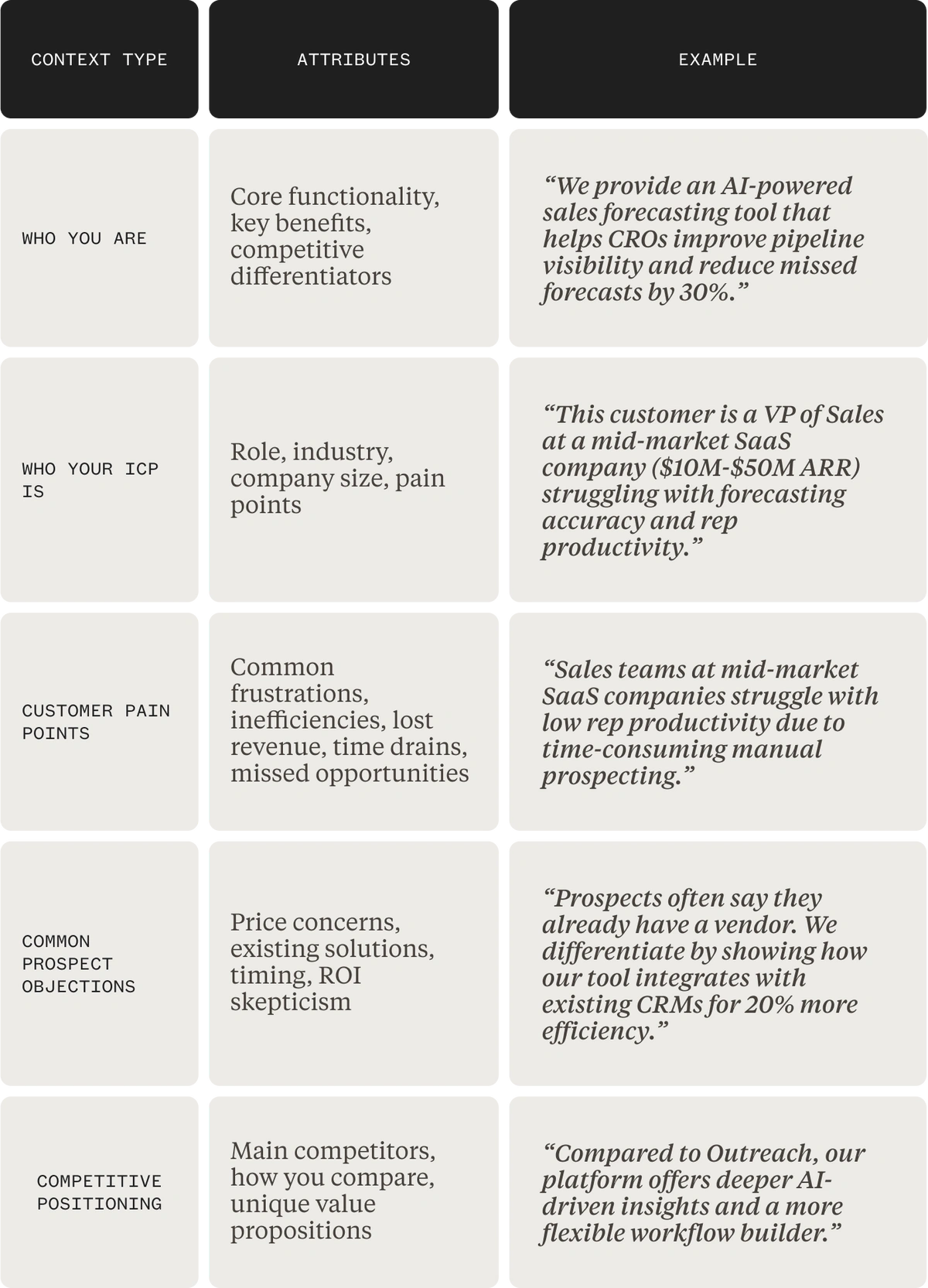
Write them out and store them somewhere accessible.
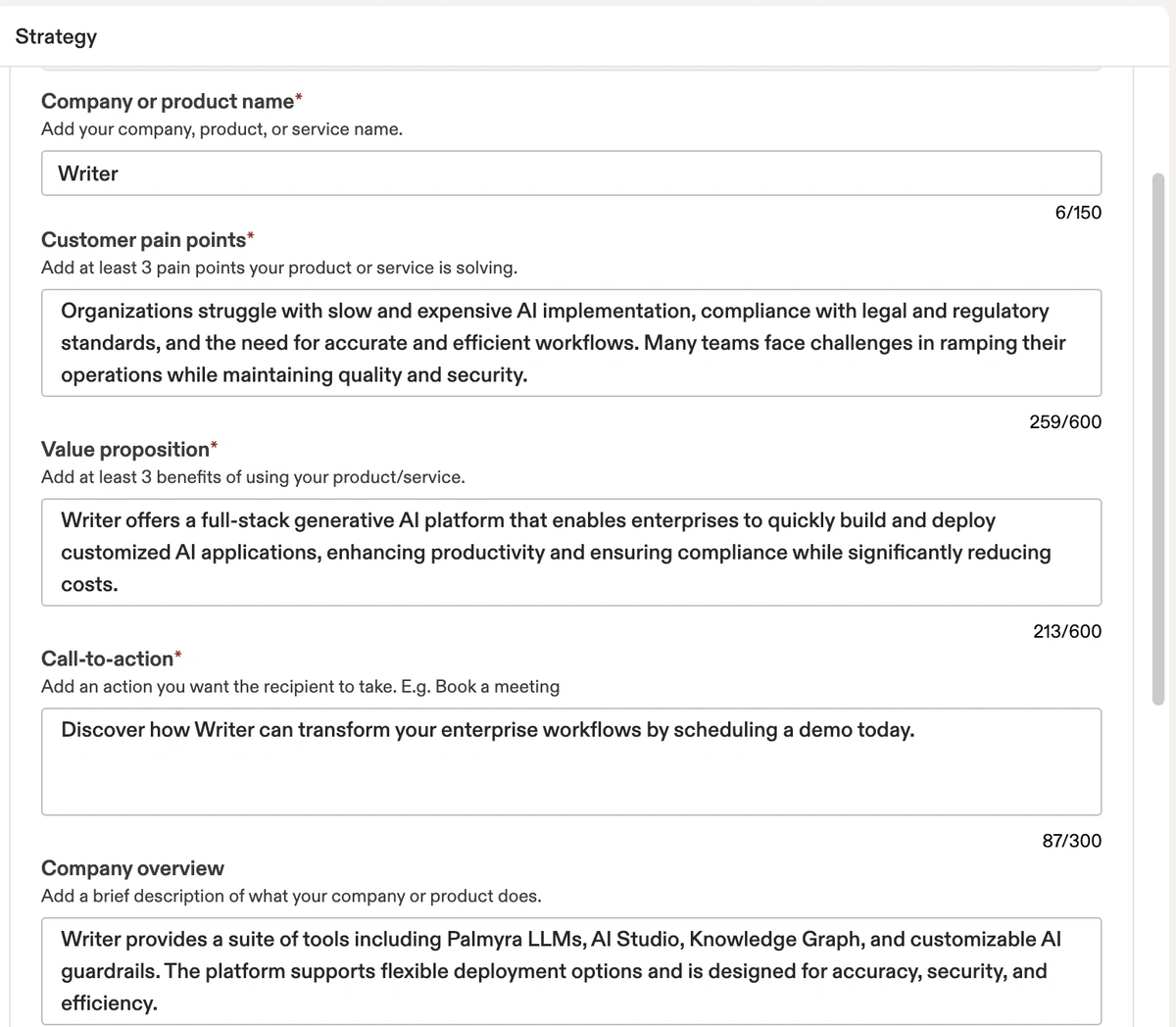
If you use Apollo, you can store them in the AI Content Center. It allows you to create and store bits of context like these and funnel them into bite-sized, personalized emails.
I tested it out as if I was a rep from Writer and fed Apollo information around my hypothetical pain points and value props. Considering these are good clips of context to have within my AI tool anyway, I thought the email output was pretty solid.
Considering these are good clips of context to have within my AI tool anyway, I thought the email output was pretty solid.
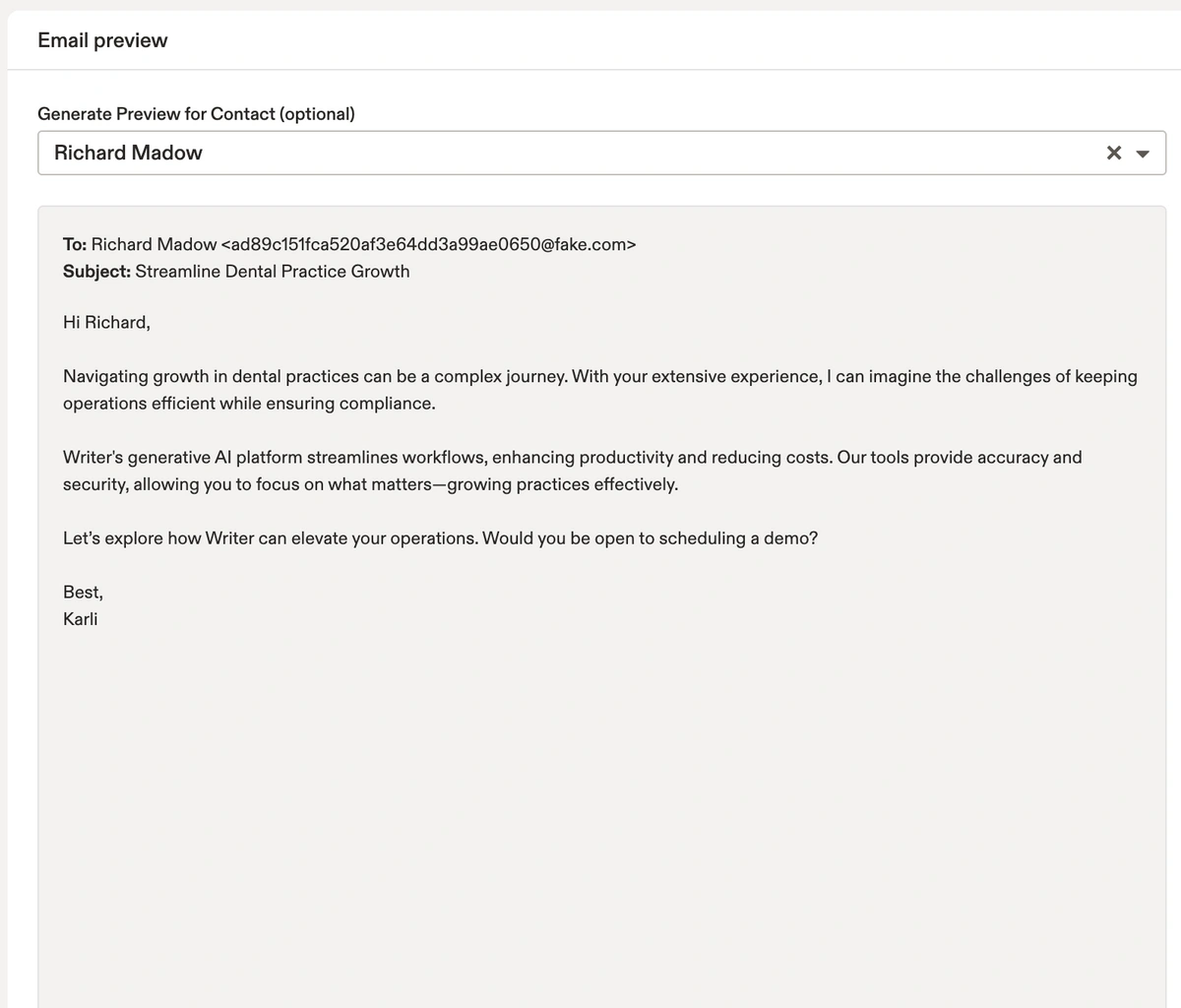
But, the biggest benefit of configuring the Content Center is to train Apollo's AI on who you are and what you offer to fuel more powerful features like prompting.
Tip #2: Ask AI to self-reflect
"Garbage in, garbage out." Another great AI one-liner from Samuel.
What he means is, the quality of your input directly determines the quality of your output. And, like we've established, to get the strongest possible results, you need to understand the way it reads language.
And what better way than to…just ask it?
Samuel does this with a simple line:
"Before you begin, return with five questions you have."
A simple command that gets AI to poke holes in itself; to self-identify the gaps in its knowledge, the gaps in the prompt, and communicate back to him what it needed.
He was creating a real conversation.
"I guarantee you that you'll be pleasantly surprised with how well AI is understanding and thinking about very key aspects that you left out of your prompt. It's going to make sure you get a much better output," he says.
I started using this tactic myself and quickly saw the benefits:
- Better outputs, faster. I get more precise results with less trial and error.
- Less time spent rewriting prompts. Getting it right the first time saves effort.
- Learning AI's "language". I'm understanding how it thinks, and it's making me a stronger prompt writer.
Tip #3: AI prompting is a marathon — not a sprint
Like any other skill, prompting is something that develops and strengthens over time.
Samuel offers some perspective for any newbie. "It's completely normal for only half of your prompts to provide the exact output you are looking for at first," he says.
So, don't give up! When you get to the point where you're using libraries of proven prompts to save hours daily, your future self will thank you for staying the course.
An outbound sales-specific prompt structure
If you're writing prompts to generate outbound emails, structure matters.
The quality of your output doesn't just depend on what you say; it depends on how you say it and in what order. Apollo's team of prompt engineers (yes, that's a thing now) has tested countless combinations to figure out what consistently delivers punchy, relevant, high-converting cold email drafts.
Here’s the structure they recommend for outbound sales prompts.
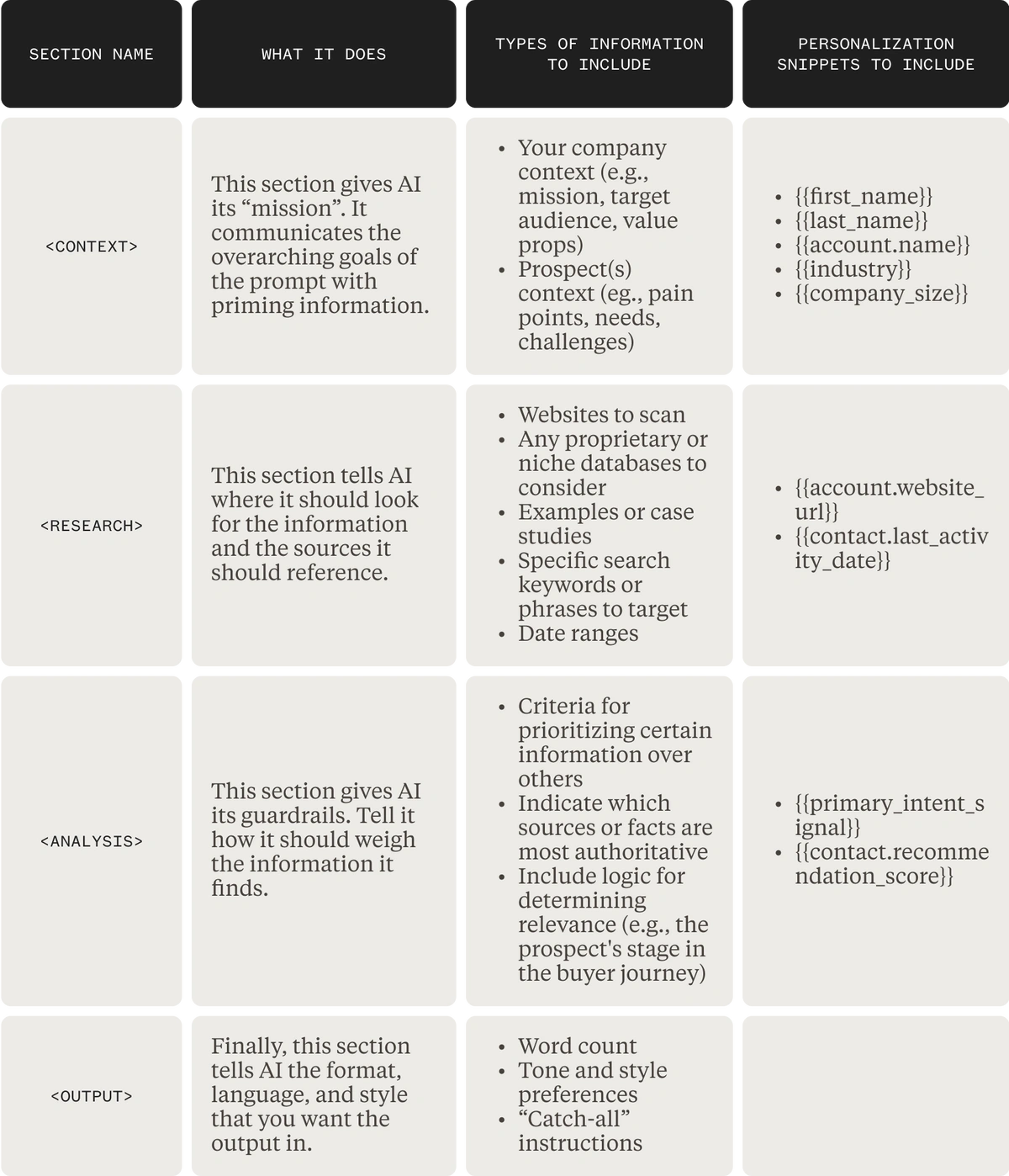
Consider this as one of many strategies for getting a good output.
The team from Smartling 10'xd their SDRs productivity and pipeline with a much simpler Power-up prompt that uncovers if a website offers translation services:
"Look at the {{account.website_url}} of this {{account.name}} and determine if you can toggle between multiple languages. If it can be, then figure out if the website has any gaps in its translation. If so, return to what those reasons are."
While, the folks on the Labs team often take a "long scroll" approach.

Prompting is often just a matter of knowing where to start and iterating from there.
In a recent template contest, hundreds of folks from the Apollo community submitted their most effective prompts in the hopes it might give other sales orgs a headstart, too.
I had the privilege of speaking with a few standout contributors.
- Dhara Patel wrote a prompt to automatically research for her construction company's most important buying signal
- Rene Cobar's AI prompt pulls competitor insights directly into outbound messages
- And Carol Olona put together a prompt that digs up a prospect's product, pricing, and market fit in just a few focused paragraphs
Their exact prompts are available in the Apollo template library and product itself, ready to use, tweak, or inspire something entirely your own.
AI prompt examples that actually work
Theory's great, but what you really need are prompts you can copy, paste, and customize right now. Here are battle-tested examples from real sales teams getting real results.
For initial outreach:
"Act as an experienced B2B sales rep who specializes in [your industry]. Write a 3-paragraph cold email to [prospect name], the [title] at [company]. The goal is to book a 15-minute discovery call. Context: Our product helps [your value prop]. The prospect's company recently [trigger event]. Use a conversational tone and include one specific question about their current process."
For follow-up messages:
"You're an SDR following up on a cold email sent 3 days ago (no response). Write a brief, friendly follow-up that references the original email's main point about [topic]. Add a new piece of value — either a relevant insight about their industry or a quick tip they can implement today. Keep it under 100 words and end with a soft call-to-action."
For LinkedIn connection requests:
"Create a LinkedIn connection request message for [prospect name] at [company]. I noticed they [specific thing from their profile]. Keep it under 300 characters, mention one thing we have in common, and don't pitch anything. Sound like a real person reaching out, not a salesperson."
Remember: these are starting points. The magic happens when you customize them with your specific context, your unique value prop, and details about your actual prospects.
Start writing AI prompts that get results
Learning to write effective prompts is one of the highest-leverage skills a sales professional can develop today. It's the difference between treating AI as a novelty and using it as a powerful assistant that can research prospects, draft outreach, and fill your pipeline.
The key is to stop thinking about it as a magic box and start treating it like a conversation. Be clear, provide context, and don't be afraid to refine your approach. With the right techniques and a powerful tool, you can turn prompting into your competitive advantage. Ready to put these principles into practice? Get Started with Apollo's AI to build pipeline faster.
Frequently asked questions about AI prompts
What are some good AI prompts for sales prospecting?
A good sales prompt is highly specific. For example: "Act as an SDR for a B2B SaaS company that sells project management software. Write a three-paragraph cold email to the Head of Marketing at a mid-sized tech company. The goal is to book a 15-minute discovery call. Mention their recent company funding round as a trigger event."
How long should an AI prompt be for best results?
There's no magic length. A prompt should be long enough to provide all the necessary context, persona, and formatting instructions, but short enough to be clear and focused. A few detailed sentences are often better than a single vague one.
Can I reuse the same AI prompt for different prospects?
You can reuse the structure of a prompt, but you should always customize the specific details (like name, company, and pain points) for each prospect. Apollo's AI allows you to use variables in your prompts to automate this personalization at scale.
Share this post
Start using Apollo today
Start your free trial with Apollo today—then use these resources to guide you through every step of the process.
Start using Apollo today
Start your free trial with Apollo today—then use these resources to guide you through every step of the process.
or
By signing up, I agree to Apollo's Terms of Service and Privacy Policy.
Continue Learning
Explore these handpicked resources to deepen your understanding of AI-powered GTM
The Future of Go-to-Market
Data vendor, sequencer, enrichment tool, dialer, RevOps stitching it all together. That's how GTM has been built for a decade. Here's why it's time for that to end, and the system replacing it.
Apollo Launches Agents: Find More Buyers, Build Better Sequences, Improve What’s Working, All Without Asking
GTM systems should get smarter over time, learning what works for your business and proactively finding ways to improve. Apollo CPO Mark Sieglock explains how Apollo is building that system, and bringing recommendations directly to you via Slack.
How Popl Turns Badge Scans Into Clean Contacts at 99% Email Coverage With Apollo
Learn how Popl, the leader in event lead capture, used the Apollo data they already knew and trusted to build an in-person go-to-market product and disrupt the lead capture space.
A CEO’s Guide to GTM: What used to cost millions, now costs $30
AI has changed the economics of GTM. Apollo CEO Matt Curl explains how a workflow that once required a team and millions of dollars now takes 30 minutes, $30, and the right context.